Try Google Drive: organize files, folders and permissions with AI now, no sign-up needed

Google Drive: organize files, folders and permissions with AI · Bring order to the Drive you already have
For freelancers, agencies, professional firms and small and medium-sized businesses with thousands of files like “final budget (2) copy.” We give you your industry’s naming convention, renaming for your own files, the folder tree as a ZIP, the permissions policy and Drive searches ready to paste.
In the features that use AI, responses are generated by artificial intelligence and are not a substitute for professional advice.
Perdi partite perché muovi la pedina sbagliata con il dado già in mano?
Nel Ludo il dado è caso, ma la mossa è una decisione. Con le tue 4 pedine e le 12 dell'avversario sul tabellone ci sono mosse che ti lasciano esposto al 42,1% e altre che ti lasciano a zero, e a occhio non si distinguono. Questo strumento fa il calcolo per te: imposti la posizione, premi il tuo tiro e ricevi la classifica delle mosse con il loro rischio di cattura, la loro probabilità di catturare e una frase che spiega il perché. Il motore è deterministico e gira sul tuo telefono, quindi la stessa posizione dà sempre lo stesso consiglio.
See the tools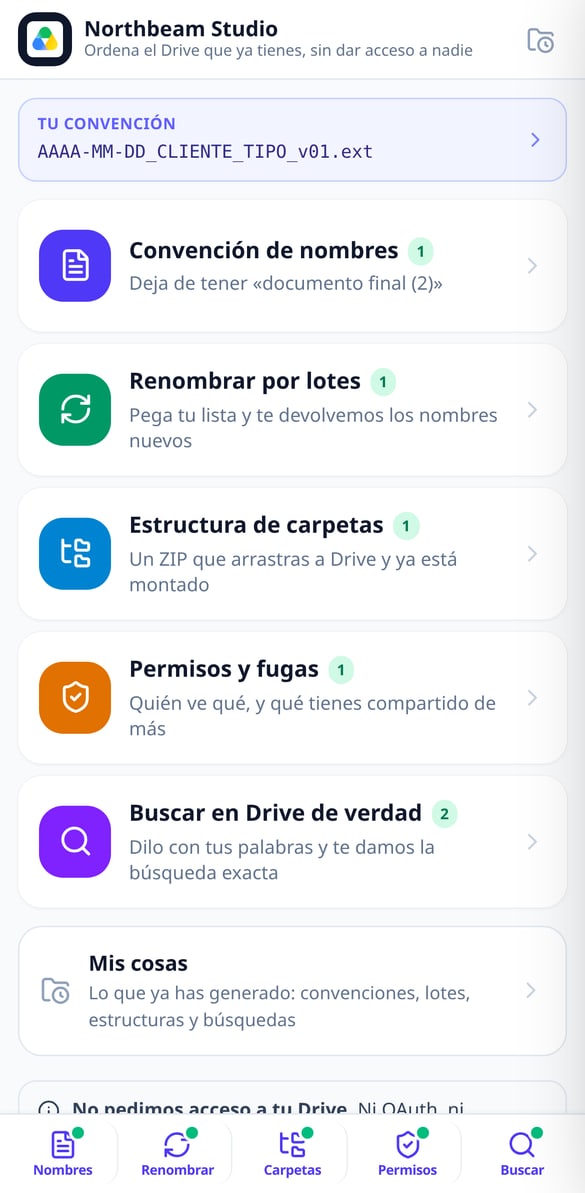
Discover every feature in detail

File Naming Standard by Industry | Google Drive
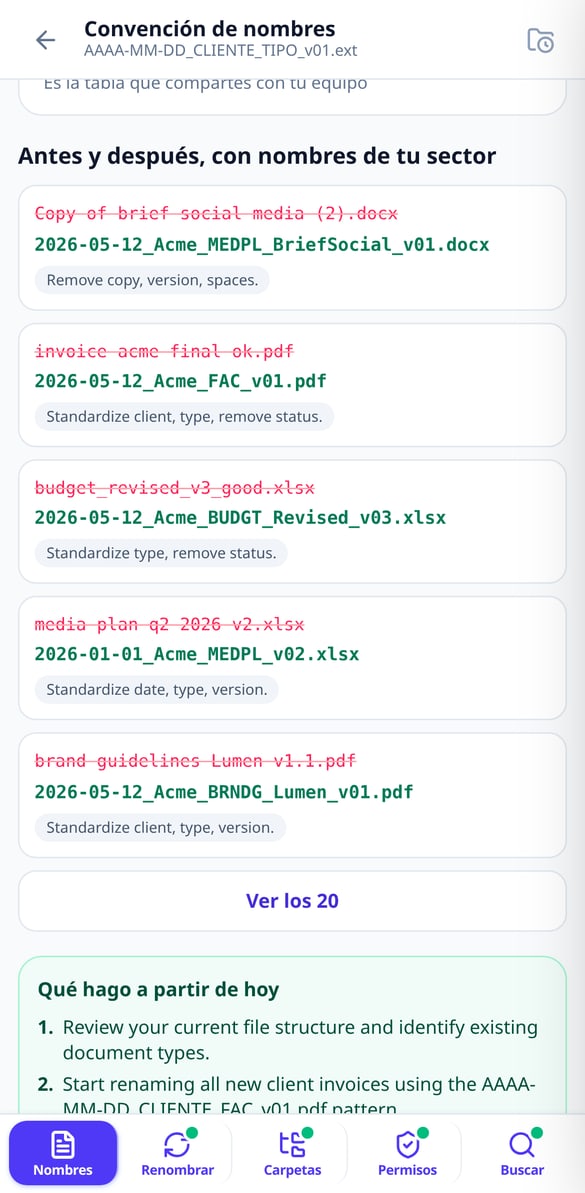
Choose your industry and the naming blocks and get the complete formula (YYYY-MM-DD_CLIENT_TYPE_v01), the 5 rules, your profession’s abbreviations, and before & after examples. Without connecting your Google account.
Try it free
Batch Rename Files | Google Drive
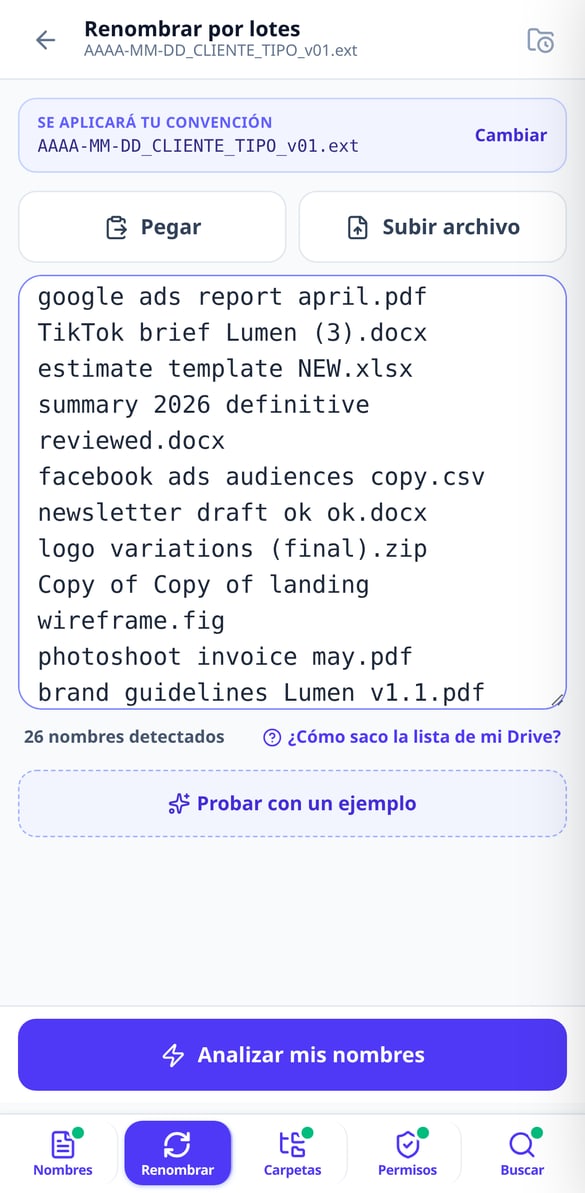
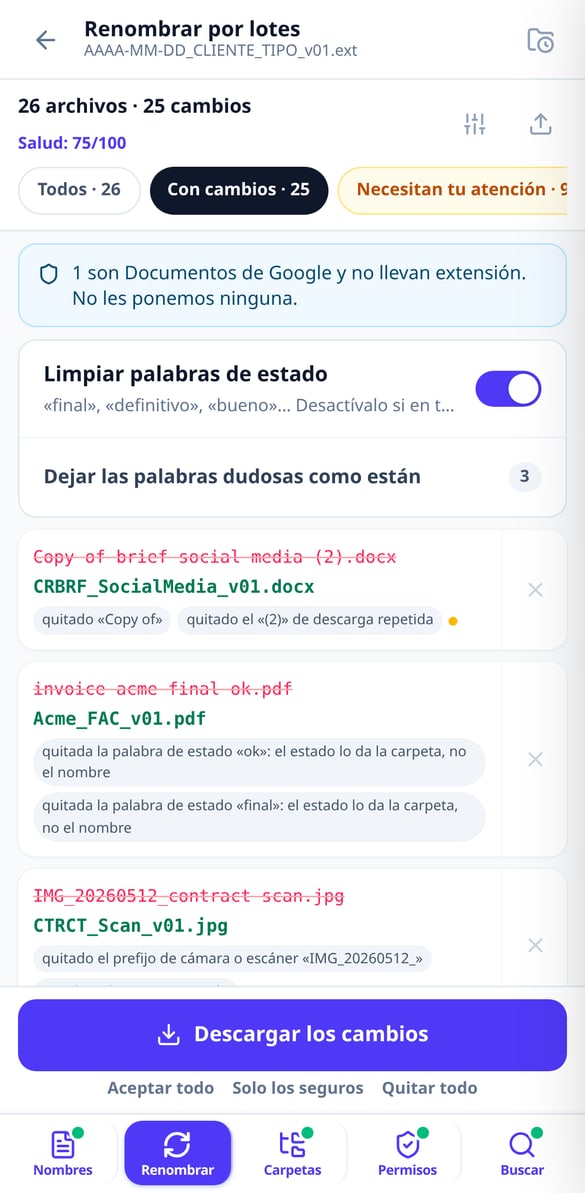
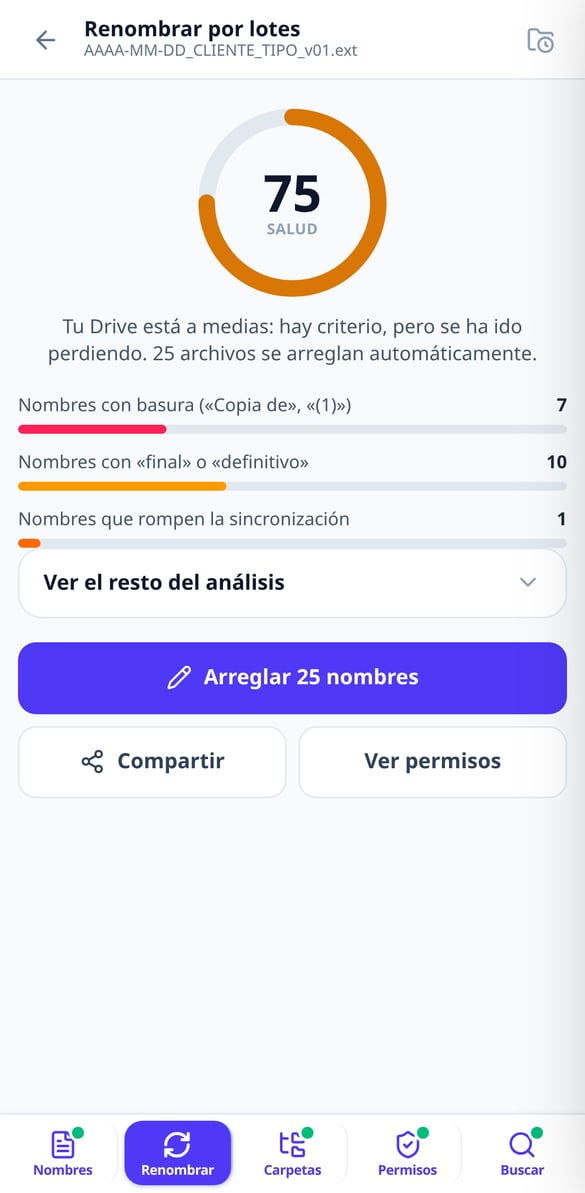
Paste your file list and get a table showing current name → new name with the reason for each change. Up to 1,000 names, export in CSV or XLSX, and a script to apply it to your Drive. Without connecting your account.
Try it free
Apps Script script to rename files in Google Drive
Generate a Google Apps Script script with your name mapping already included: it runs in your account, with test mode enabled, resumable batches, and a final report. Without us needing access to your Google Drive.
Try it free
Google Drive Health Score: Grade your clutter
Paste your file name list and receive a score from 0 to 100 with a public formula: junk in names, status words, sync-breaking characters, duplicates, and mixed dates. Without connecting your account.
Try it free
Folder Structure for Google Drive Ready in ZIP
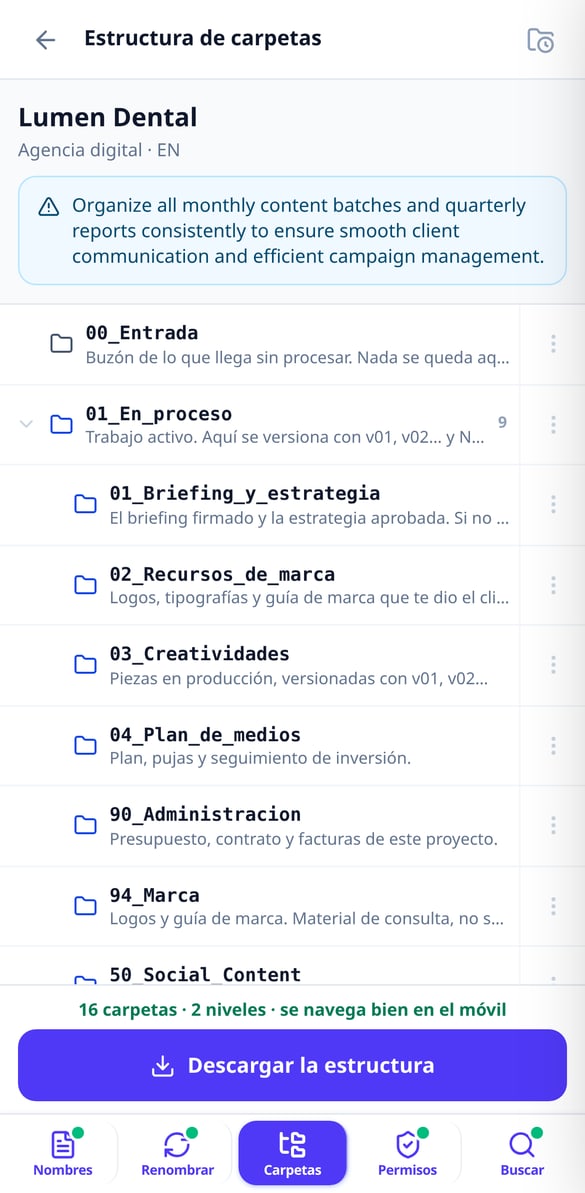
Choose your work type and we’ll set up the project folder structure for you, numbered so Drive orders it and with a maximum of 3 levels. Download it in ZIP and drag it to Drive. Without connecting your account.
Try it free
Google Drive Permissions: Your Policy in Five Questions
Answer five questions and we’ll give you your Google Drive permissions policy in writing: calculated risk level, My Drive versus Shared drives matrix, eight audit searches, and the offboarding checklist. Without connecting your account.
Try it free
Advanced Google Drive search in natural language
Type or dictate what you're looking for and we'll give you the exact advanced Drive search query: type:, title:, owner:, from:, after:. Explained piece by piece, ready to copy. Without connecting your account.
Try it freeFive tools for the Drive you already have
Tre strumenti in uno, tutti con il numero davanti: il coach della mossa, la clinica per sapere se è stata sfortuna o un errore, e il torneo tra amici pronto da incollare su WhatsApp.

Naming convention and batch renaming
Choose your industry from 11 and get the naming formula (YYYY-MM-DD_Client_TYPE_v01), your industry’s document abbreviations and 20 before-and-after examples. Then paste your names —up to 300 without an account, 1,000 with an account— and we’ll return the “current name → new name” table with the reason for each change, in CSV or XLSX.

Folder tree ready to drag and drop
Choose your type of work from 11 and we’ll build the structure by lifecycle —an intake folder, a work-in-progress folder, a client review folder, a deliverables folder and the archive—, numbered so Drive sorts it for you and with a maximum of 3 levels so it stays navigable on mobile. Each folder comes with its written guide inside. Take it as a ZIP or create it in your Drive with the script we give you.

Auditable permissions and searches that actually find
Five questions and you have your written permissions policy, the My Drive vs. Shared drives matrix, the checklist for when someone leaves and 8 audit searches. Describe what you’re looking for in one sentence and we’ll give you the Drive query explained operator by operator, with a link to open it in your account.
Three steps, nothing to install and no permissions to grant
Monta il tuo tabellone
Scegli il tuo colore e tocca le caselle per posizionare le tue pedine e quelle degli avversari che ti minacciano. Non serve metterle tutte e 16: bastano le minacce vicine. Se preferisci la scorciatoia, carica uno screenshot della tua partita e lo legge un modello di visione; tu correggi solo quello che non torna prima di analizzare.
Premi il tuo tiro
Tocca la faccia del dado che ti è uscita. Non c'è un pulsante analizza: la classifica appare da sola. Se ti sono usciti 6 di fila, li impili e il motore pianifica l'intera sequenza (e avvisa quando il triplo 6 annulla il turno). Se non hai ancora tirato, il piano per tiro ti dà la mossa migliore per ognuna delle sei facce.
Muovi sapendo cosa rischi
Vedi la mossa consigliata, due alternative e il dettaglio avversario per avversario della percentuale di cattura. Applichi la mossa e il tabellone passa al turno successivo, così la volta dopo non devi riposizionare nulla. Al ritorno, l'app riprende la partita da dove l'avevi lasciata.
Frequently asked questions
Your Drive organized today, not “someday”
Monta il tabellone, premi il dado e muovi sapendo esattamente cosa rischi. Gratis, senza registrazione e senza installare nulla.